Utilities
S Clothing
Clothing store with Boss menu
Description from the developer
The text below was supplied by Vireon Studios and is reproduced as written. ViceHub has not verified its claims.
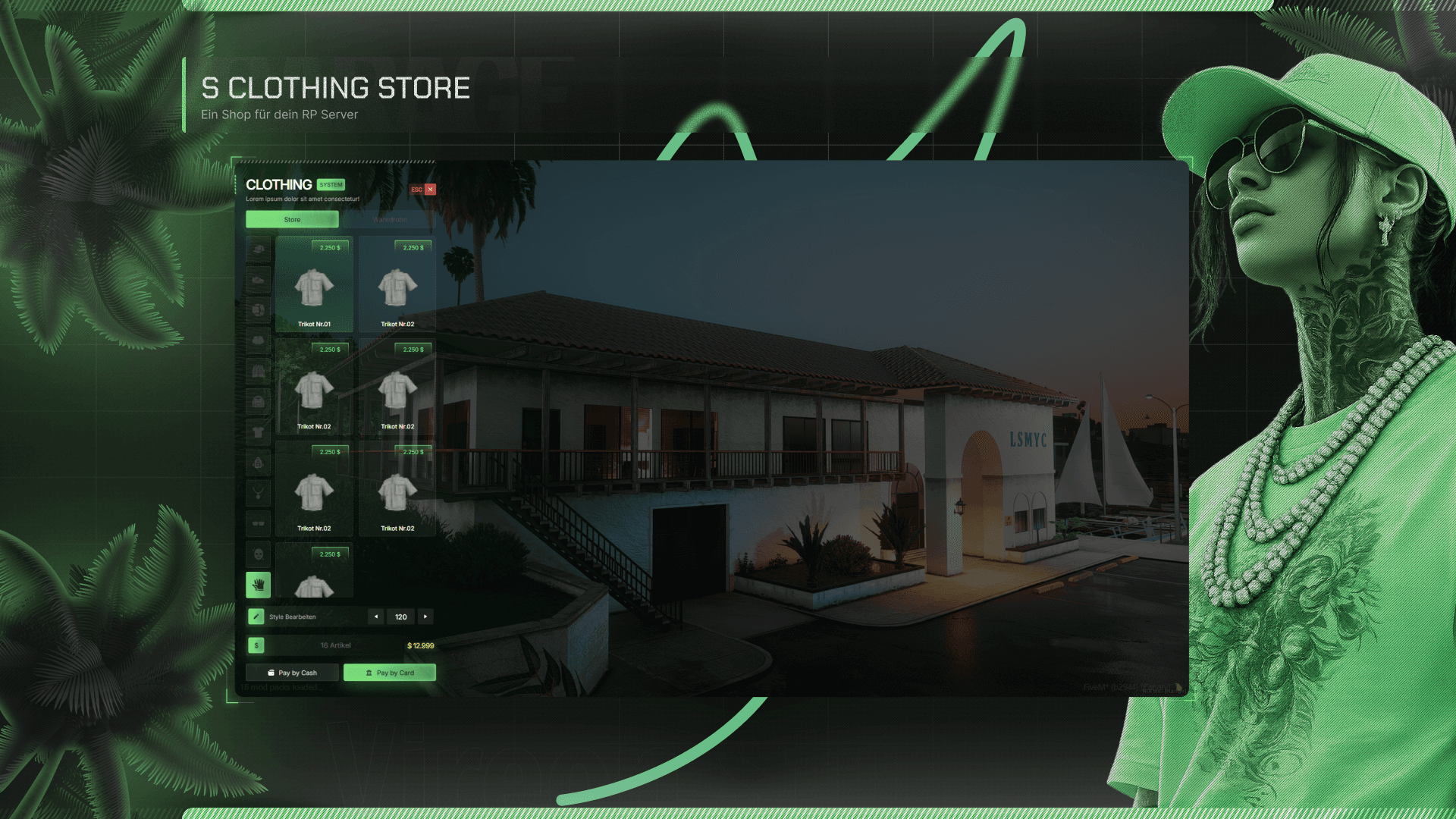
S Clothing Das moderne Clothing-Store-System für FiveM S Clothing ist ein modernes und umfangreiches Clothing-Store-System, das nicht nur das klassische Anprobieren und Kaufen von Kleidung ermöglicht, sondern gleichzeitig neue Möglichkeiten für Wirtschaft und Roleplay auf eurem Server schafft. Spieler können ihre eigenen Clothing Stores kaufen, verwalten und anschließend betreiben. Dabei können sie Preise selbst festlegen, Rabattaktionen anbieten und ihren Store später sogar wieder verkaufen. Das gesamte System wird durch ein modernes und übersichtliches UI abgerundet. Hauptfeatures Clothing Store Ein vollständiges Clothing-Store-System mit modernem UI und einer übersichtlichen Benutzeroberfläche. Spieler können: Kleidung durchsuchen Kleidung nach Kategorien auswählen Clothing Items anhand von Bildern ansehen Preise einsehen Kleidung kaufen verschiedene Stores nutzen Clothing Kategorien Die Kleidung wird übersichtlich in verschiedene Kategorien aufgeteilt. Dadurch können Spieler schnell und einfach die gewünschten Kleidungsstücke finden und auswählen. Clothing Images Die Clothing Items werden direkt mit entsprechenden Bildern dargestellt. So können Spieler bereits vor dem Kauf sehen, welches Kleidungsstück sie auswählen. Store Management Eigene Clothing Stores Ein besonderes Feature von S Clothing ist die Möglichkeit, eigene Clothing Stores zu kaufen und zu verwalten. Dadurch wird aus einem normalen Clothing Store ein Teil der Server-Wirtschaft. Besitzer können ihren Store selbstständig verwalten und verschiedene Einstellungen vornehmen. Verwaltungsmöglichkeiten Preise festlegen Preise einzelner Items ändern Rabattaktionen erstellen Store verwalten Store verkaufen Einnahmen verwalten Dadurch entstehen neue Möglichkeiten für wirtschaftliches Roleplay. Boss Menu S Clothing verfügt über ein integriertes Boss Menu für die Verwaltung des Clothing Stores. Das Boss Menu kann individuell aktiviert oder deaktiviert werden. BossMenu = true oder BossMenu = false Damit könnt ihr selbst entscheiden, ob das Boss Menu auf eurem Server verwendet werden soll. Stores erweitern Neue Clothing Stores können einfach über die stores.lua hinzugefügt werden. Dadurch könnt ihr beliebig weitere Standorte für eure Spieler hinzufügen und das System an eure Server-Struktur anpassen. Framework Support S Clothing verfügt über eine automatische Framework-Erkennung. Das System erkennt automatisch das verwendete Framework. Unterstützte Frameworks ESX QBCore Es ist dadurch keine aufwendige manuelle Framework-Auswahl notwendig. Modernes UI S Clothing verfügt über ein modernes und übersichtliches UI, welches speziell für ein hochwertiges FiveM-Erlebnis entwickelt wurde. Das Design ist auf eine einfache Bedienung ausgelegt und lässt sich optisch an eure eigenen Vorstellungen anpassen. Performance Performance spielt bei S Clothing eine wichtige Rolle. Das System wurde auf eine möglichst geringe Client-Auslastung optimiert. Performance Bis zu 0.02 ms Die tatsächliche Performance kann je nach Server, Umgebung und Nutzung variieren. Anpassung & Figma Einige Elemente des Systems besitzen eigene Backgrounds bzw. grafische Elemente. Diese können extrahiert und beispielsweise in Figma individuell angepasst werden. Ihr könnt dadurch beispielsweise: Hintergründe verändern eigene Designs erstellen Farben anpassen das UI an euren Server anpassen Ihr kennt euch mit Figma nicht aus? Kein Problem. Falls ihr nicht wisst, wie die entsprechenden Elemente angepasst werden können oder ihr Unterstützung bei der Bearbeitung benötigt, könnt ihr euch an unseren Support wenden. Wir helfen euch dabei gerne weiter. Enthaltene Features Feature Enthalten Clothing Store Ja Clothing Kategorien Ja Clothing Images Ja Boss Menu Ja Store Management Ja Eigene Stores kaufen Ja Stores verkaufen Ja Preisverwaltung Ja Rabattaktionen Ja Neue Stores hinzufügen Ja Automatische Framework-Erkennung Ja ESX Support Ja QBCore Support Ja Modernes UI Ja Figma Anpassungsmöglichkeiten Ja Support Der Support für S Clothing findet ausschließlich über unseren Discord statt. S Clothing Discord Wichtig Support wird nur über Tickets angeboten. Kein Support per DM. Bitte erstellt bei Fragen, Problemen oder benötigter Hilfe ein entsprechendes Support-Ticket auf unserem Discord. S Clothing Ein Clothing Store ist nicht nur ein Ort zum Kleidung kaufen. Mit S Clothing wird daraus ein eigener Bestandteil eurer Server-Wirtschaft und des Roleplays. Moderne UI. Eigene Stores. Eigene Preise. Rabattaktionen. Store Management. ESX & QBCore Support. Automatische Framework-Erkennung. Optimierte Performance. S Clothing The Modern Clothing Store System for FiveM S Clothing is a modern and feature-rich clothing store system designed to bring more depth, flexibility, and roleplay opportunities to your FiveM server. With S Clothing, players can purchase, manage, and operate their own clothing stores. Store owners can control prices, create discount campaigns, manage their business, and eventually sell their store to another player. The entire system comes with a modern and clean UI designed for an intuitive and immersive experience. Main Features Clothing Store A complete clothing store system with a modern and easy-to-use interface. Players can: Browse clothing items Select clothing by category View clothing images Check prices Purchase clothing Use different clothing stores Clothing Categories All clothing items are clearly organized into different categories. This allows players to quickly find and select the clothing items they are looking for. Clothing Images Clothing items are displayed with corresponding images. Players can therefore preview the clothing before making their purchase. Store Management Own Your Clothing Store One of the main features of S Clothing is the ability for players to purchase and manage their own clothing stores. This turns a regular clothing store into an actual part of your server's economy. Store owners can manage their business and control different aspects of their store. Management Options Set clothing prices Change individual item prices Create discount campaigns Manage the store Manage store income Sell the store This creates additional opportunities for economy-based roleplay. Boss Menu S Clothing includes an integrated Boss Menu for clothing store management. The Boss Menu can be enabled or disabled depending on your server's requirements. BossMenu = true or BossMenu = false This gives you full control over whether the Boss Menu is available on your server. Adding New Stores Additional clothing stores can easily be added through the stores.lua configuration file. This allows you to add as many additional locations as needed and adapt the system to your server structure. Framework Support S Clothing includes automatic framework detection. The system automatically detects which supported framework is being used on your server. Supported Frameworks ESX QBCore No complicated manual framework selection is required. Modern UI S Clothing comes with a modern and clean user interface designed specifically for FiveM. The UI focuses on: Easy navigation Clean design Modern visuals Simple interaction Customization options Performance Performance was one of the main priorities during the development of S Clothing. The system has been optimized to keep resource usage as low as possible. Performance Up to 0.02 ms Actual performance may vary depending on your server environment, usage, and configuration. Customization & Figma Some elements of the UI include individual backgrounds and graphical elements. These elements can be extracted and customized using Figma. You can use this to: Change backgrounds Create your own designs Adjust the visual style Adapt the UI to your server Customize graphical elements Don't know how to use Figma? No problem. If you are unfamiliar with Figma or need assistance with customizing the graphical elements, you can contact our support team. We will be happy to help you with the customization. Included Features Feature Included Clothing Store Yes Clothing Categories Yes Clothing Images Yes Boss Menu Yes Store Management Yes Purchase Own Stores Yes Sell Stores Yes Price Management Yes Discount Campaigns Yes Add New Stores Yes Automatic Framework Detection Yes ESX Support Yes QBCore Support Yes Modern UI Yes Figma Customization Yes Support Support for S Clothing is provided exclusively through our Discord server. S Clothing Discord Important Support is available through tickets only. No support via DM. If you have questions, encounter an issue, or need assistance with the product, please create a support ticket on our Discord server. S Clothing A clothing store doesn't have to be just a place where players buy clothes. With S Clothing, clothing stores can become an important part of your server's economy and roleplay. Modern UI. Ownable Stores. Custom Prices. Discount Campaigns. Store Management. ESX & QBCore Support. Automatic Framework Detection. Optimized Performance.
Reviews
No reviews yet
Be the first to tell other server owners how this resource works.
Related resources
Related FiveM articles
 Jul 13, 2026
How Many Players Does a FiveM Server Need to Feel Alive?
The median FiveM server peaked at two players. Not two hundred — two. We measured 31,334 of them. Here is what a server realistically needs to feel alive, and why your slot count is fiction.
 Jul 13, 2026
FiveM Server Requirements: What Actually Matters (and What Hosts Invent)
Every FiveM server requirements table you have read was invented by a company selling servers. Cfx.re publishes no hardware spec at all. Here is what actually determines whether your server runs well.